Tap into the power of ChatGPT and AI image generation through text messages
With TextGPT you can easily access OpenAI’s ChatGPT and image models through text messaging, receiving quick and accurate answers to any question you may have and generating realistic images with a simple text.
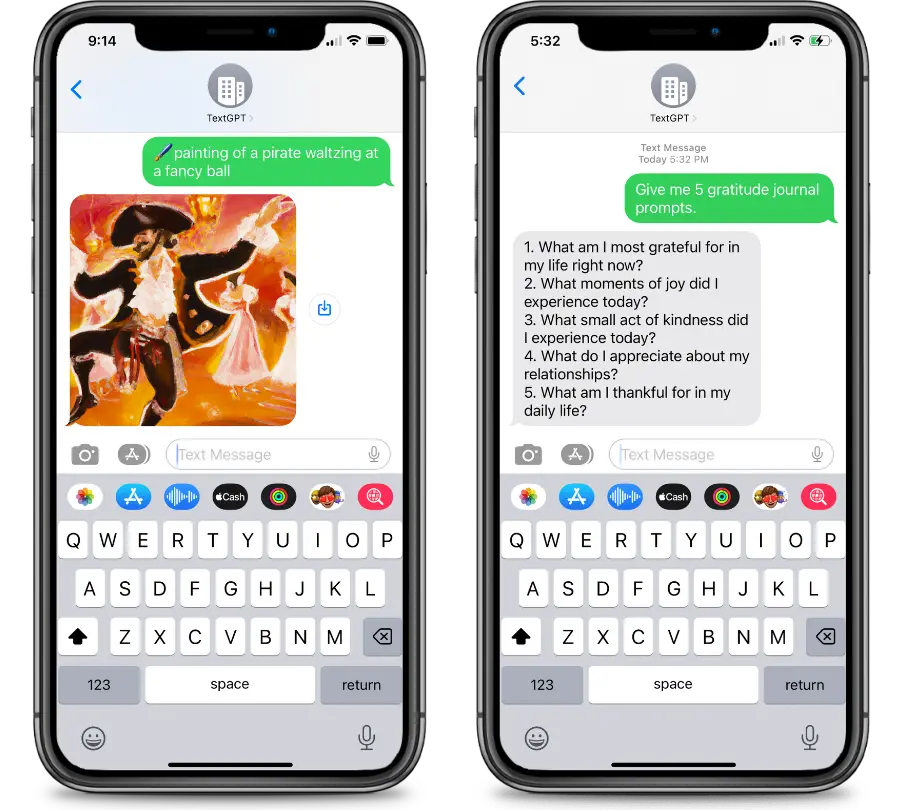
TextGPT is more than just a question and answer app
it's a powerful tool for improving your knowledge and understanding of the world around you.

Pricing
Credits come in two packs. $12 gets you 240,000 credits, and $24 gets you 480,000. On the default tier that is around 120 questions per $12, depending on how long the answers run and how much thinking you ask for.
Each exchange costs credits for two things: the text messages themselves, and the AI's work. Messaging is charged per segment, which is how phone networks bill — 160 characters, or 70 if the message contains an emoji. That works out at 312 credits to receive your text and 327 for each segment sent back, so a short answer costs one and a long one costs several.
The AI's part is charged by the token — roughly 4 characters, or 0.75 words, of anything read or written — at the rate the tier you picked actually costs. Luna, the default, is about a tenth of Terra. Turning thinking up costs more, since time spent thinking is charged like any other writing. Looking something up on the web costs 600 credits for the search.
Images cost what you choose them to. Three quality levels are available on your account page: 1,422 credits for a draft, 4,242 for standard, or 13,722 for the sharpest results — messaging included. Texting a photo and simply asking about it is charged like any other question.
You can see your balance, and change which model answers you, on your account page.
Coming Soon
- Use past conversation for better results
- Backup your conversation to the cloud
- Advanced tuning and configuration
What model does TextGPT use?
TextGPT runs on OpenAI's GPT-5.6 family, trained on data through February 2026. You can pick which of the three tiers answers you: Luna is fastest and lightest on credits, Terra is the balanced default, and Sol does the deepest reasoning on hard problems. All three have internet access through OpenAI's web search, so they handle both general knowledge and questions about things happening right now. You can switch tiers, and change how long the assistant thinks before replying, on your account page.
How do I generate an image through TextGPT?
Start your message with the 🖌️ or 🖼️ emoji, then describe what you want. Hit send and the picture comes back as a text message. ex: 🖌️ surrealist image of a dog park carnival. Images are generated with OpenAI gpt-image-2. What they cost depends on the quality you pick on your account page: 1,422 credits for a draft, 4,242 for standard, or 13,722 for the best.
Can I send TextGPT a photo?
Yes. Attach a picture and TextGPT works out what you want from it. Ask something about the photo and you get an answer back as a text, charged like any other question. Ask for a change — "make the sky purple", "remove the background" — and you get an edited version back as a picture, priced by the same quality setting.
Is TextGPT storing my data?
If you have memory enabled, your messages will be stored in our database. If you have memory disabled, your messages will not be stored. You can also delete your messages at any time.